.svg)





.png)

Two Giants of the Website World
The world of website creation has changed dramatically over the last decade. What once required professional developers and extensive coding knowledge can now be accomplished by individuals, small business owners, creative professionals, or large organizations. Among all the website building platforms available today, Webflow and WordPress stand out as the most popular choices.
Although both platforms help users build powerful websites, they are built on very different ideas. Webflow focuses on giving designers a visual method to create advanced, responsive websites without writing code. WordPress is an open-source content management system that powers a large percentage of the websites around the world.
Choosing between Webflow and WordPress can seem confusing at first, but once you understand their strengths, weaknesses, and ideal use cases, the decision becomes much easier. This article explains everything you need to know in a simple and easy-to-understand way.
Webflow and WordPress at a Glance
What is Webflow
Webflow is a visual website creation platform that allows you to design, build, and launch websites without writing code. It combines a visual editor with hosting, a content management system, and creative design control. You build your layout visually, but behind the scenes, Webflow generates clean HTML, CSS, and JavaScript.
What is WordPress
WordPress is an open source content management system that began mainly as a blogging platform but has grown into the most widely used website builder in the world. You can install themes, add plugins, write custom code, or modify every part of your site. WordPress gives you complete flexibility, but it also requires more management and maintenance.
Core Difference
Webflow offers a guided visual building experience, while WordPress provides maximum freedom through its open source structure. Both approaches have advantages, and the right choice depends completely on your needs and skills.
Ease of Use - Who Wins for Beginners
For beginners, ease of use is often the most important factor.
Webflow Experience
Webflow is intuitive once you understand the basics, but it can feel overwhelming at first because it gives design-level control similar to professional tools. You can visually style every element, adjust spacing, add animations, build responsive layouts for different screen sizes, and manage content. Once you learn how it works, it becomes extremely powerful and enjoyable.
WordPress Experience
WordPress can be simpler at the start, especially if you use a theme that is already designed. Many users only need to install a theme, edit pages, and publish posts. However, the experience becomes more complex when you need plugins, security updates, or theme customization. You may need help from designers or developers if you want full creative control.
Webflow is easier for people who want to design visually. WordPress is easier for people who want to publish content and rely on ready-made templates.
Design Freedom - Pixel Perfect Control or Template-Based Structure
Webflow Design Power
Webflow is known for its exceptional design freedom. You can create custom layouts and interactions using a visual interface. Everything from spacing, typography, animations, and grid systems can be controlled precisely. Designers love Webflow because it allows them to build sites exactly the way they imagine without touching code.
.png)
WordPress Design Power
WordPress can also be extremely flexible, but it depends on the tools you use. Many themes limit your design choices. Page builders such as Elementor or Divi offer more control, but you still might experience limitations that require coding.
.png)
Overall, Webflow gives more direct control, while WordPress gives flexibility through addons and manual coding.
Content Management - Handling Content at Any Scale
Webflow Content Management
Webflow has a built-in content management system that allows you to create collections such as blog posts, team members, projects, services, and more. It is simple and powerful, but it is not ideal for extremely large websites with thousands of pages or complex publishing systems.
WordPress Content Management
WordPress is the most widely used content management system in the world. It handles massive libraries of content easily. You can create posts, pages, custom post types, categories, and tags. News publishers, large blogs, and content-heavy websites often choose WordPress because its publishing features are unmatched.
Webflow works best for structured and design-focused content, while WordPress excels in large-scale and content-driven environments.
Addons and Integrations - Built-In Features or Large Plugin Ecosystem
Webflow Integrations
Webflow does not have a large addon library, but it integrates smoothly with a curated list of tools such as Google Analytics, Zapier, and various marketing platforms. Because Webflow focuses on stability, it avoids letting users install third-party addons that might break the site.
WordPress Plugins
WordPress has a massive library of plugins that allow you to add almost any feature imaginable. You can add galleries, forms, stores, subscriptions, learning systems, custom editors, and much more. However, plugins can affect site performance, introduce security risks, or create conflicts if they are not managed carefully.
Webflow favors safety and stability through limited but dependable integrations, while WordPress offers unlimited options that require responsibility and proper management.
Search Engine Optimization Features - Ranking Performance Compared
Both Webflow and WordPress can achieve excellent search engine optimization results when used correctly.
Webflow Search Engine Optimization
Webflow offers strong built-in search engine optimization features such as clean code output, fast loading speeds, simple meta editing tools, structured content, and automatic sitemaps. As a result of its optimized hosting, performance is often excellent without additional work.
WordPress Search Engine Optimization
WordPress search engine optimization depends on your hosting, theme, plugins, and overall setup. With the right combination of tools, WordPress can be extremely powerful, but it requires more manual adjustments. Many users install plugins like Rank Math or Yoast to help with search engine optimization.
Webflow provides strong search optimization features right out of the box, allowing users to achieve fast and reliable performance without extra setup. WordPress, on the other hand, usually requires additional setup and configuration.
Online Store Features - Selling on Webflow or WordPress
Webflow Online Store
Webflow has a built-in store system that allows you to sell products, manage inventory, collect payments, send receipts, and customize the shopping experience. It works well for small and medium-sized stores. Very large stores might find its features too limited.
WordPress Online Store
WordPress combined with WooCommerce is one of the most flexible store solutions on the internet. You can sell physical products, digital products, memberships, appointments, and more. The system can grow to support very large stores, but it requires more setup and more maintenance.
Webflow is suitable for simple and visually appealing stores, while WordPress offers more flexibility for complex or large-scale ecommerce operations.
Hosting and Performance - Speed, Security, and Reliability
Webflow Hosting
Webflow includes hosting as part of its platform. This means your site is hosted on reliable servers with built-in security, backups, and a global content delivery network. You do not have to worry about updates or server issues.
WordPress Hosting
WordPress hosting depends on the provider you choose. You can use shared hosting, managed hosting, or even a dedicated server. Hosting quality affects site speed, security, and reliability. While this gives you flexibility, it also means you must take responsibility for updates and security.
Webflow offers dependable hands-free hosting, while WordPress provides hosting flexibility that comes with more responsibility.
Costs - Which Platform Fits Your Budget
Webflow Costs
Webflow uses a subscription system. You pay for site plans and workspace plans. The pricing is predictable, but it can be more expensive for larger projects or stores.
WordPress Costs
WordPress is free to use, but you pay for hosting, premium themes, premium plugins, and developer help if needed. Costs can be low or very high depending on your choices. It can be cheaper for basic sites but more expensive for complex ones.
Webflow offers clear and predictable pricing, while WordPress can be more affordable or more costly based on how you build and maintain your site.
Scalability - Growing Your Site Over Time
Webflow Scalability
Webflow handles growth well for small and medium-sized businesses. It is stable, fast, and consistent. Very large content libraries or complex applications may eventually need a more advanced system.
WordPress Scalability
WordPress can scale to any size if it has the right hosting and setup. Many large media companies use WordPress for this reason.
Webflow supports consistent and manageable growth, while WordPress offers unlimited expansion when combined with strong hosting and careful management.
When Webflow is the Better Choice
Webflow is ideal if you want visual design control, stable hosting, modern animations, and a clean interface without constant updates or plugin management. It is perfect for designers, creative agencies, small businesses, portfolios, landing pages, and marketing websites.
When WordPress is the Better Choice
WordPress is the right choice if you want deep customization, endless flexibility, a huge content library, or advanced ecommerce needs. It is especially strong for blogs, news sites, stores with many products, or any project that requires unique functionality.
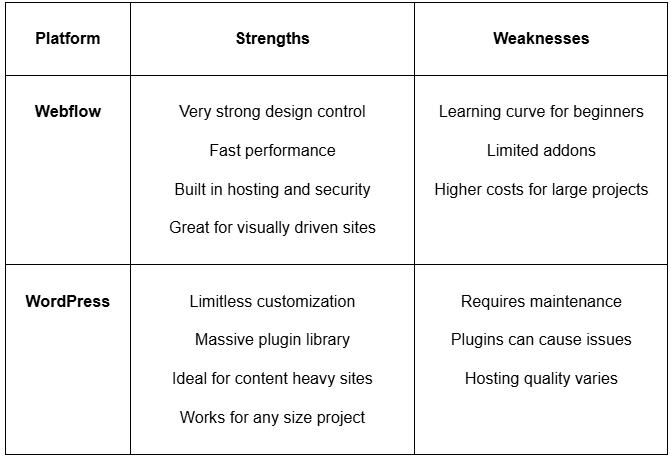
Summary of Strengths and Weaknesses
A quick comparison of what each platform does well and where each one faces challenges.
Choosing the Right Platform for Your Needs
Choosing between Webflow and WordPress ultimately comes down to how you prefer to build and manage your online presence. Both platforms are powerful in their own ways, but Webflow stands out for those who want a modern, visual, and design-driven experience without the ongoing burden of plugins, updates, or complex technical maintenance. Its clean interface, built-in hosting, and pixel-perfect design freedom make it an excellent choice for anyone who values creativity, speed, and reliability.
WordPress remains unmatched in its flexibility and scalability for highly customized or content-heavy projects. However, for most businesses, creators, and brands looking for a seamless and future-ready platform, Webflow offers a smoother, more enjoyable, and far more efficient path from idea to live website.
If you are ready to build a high-quality Webflow website that looks stunning and performs flawlessly, you can contact Become in craft modern Webflow experiences tailored to your goals.
Or save this article as a PDF for future research, workshops and strategy sessions








.svg)