.svg)





.png)

Building and running a website has traditionally meant a chain of separate tools and separate people: design, development, content, deployment, campaigns, each with its own queue. At this year's conference, Webflow outlined where it sees that workflow heading: AI agents woven directly into every part of it, working alongside the team rather than sitting outside as a chat box bolted onto the dashboard.
Webflow announced several updates, from features arriving this month to an entirely new platform still in early preview. Here's a breakdown of what was announced, what's available today, and what's still on the horizon.
1. MCP 2.1: More Agent Access Inside Webflow
This is one of the most immediately useful updates if you're building day to day. Webflow is expanding its MCP so external agent tools can work more deeply inside a live project.
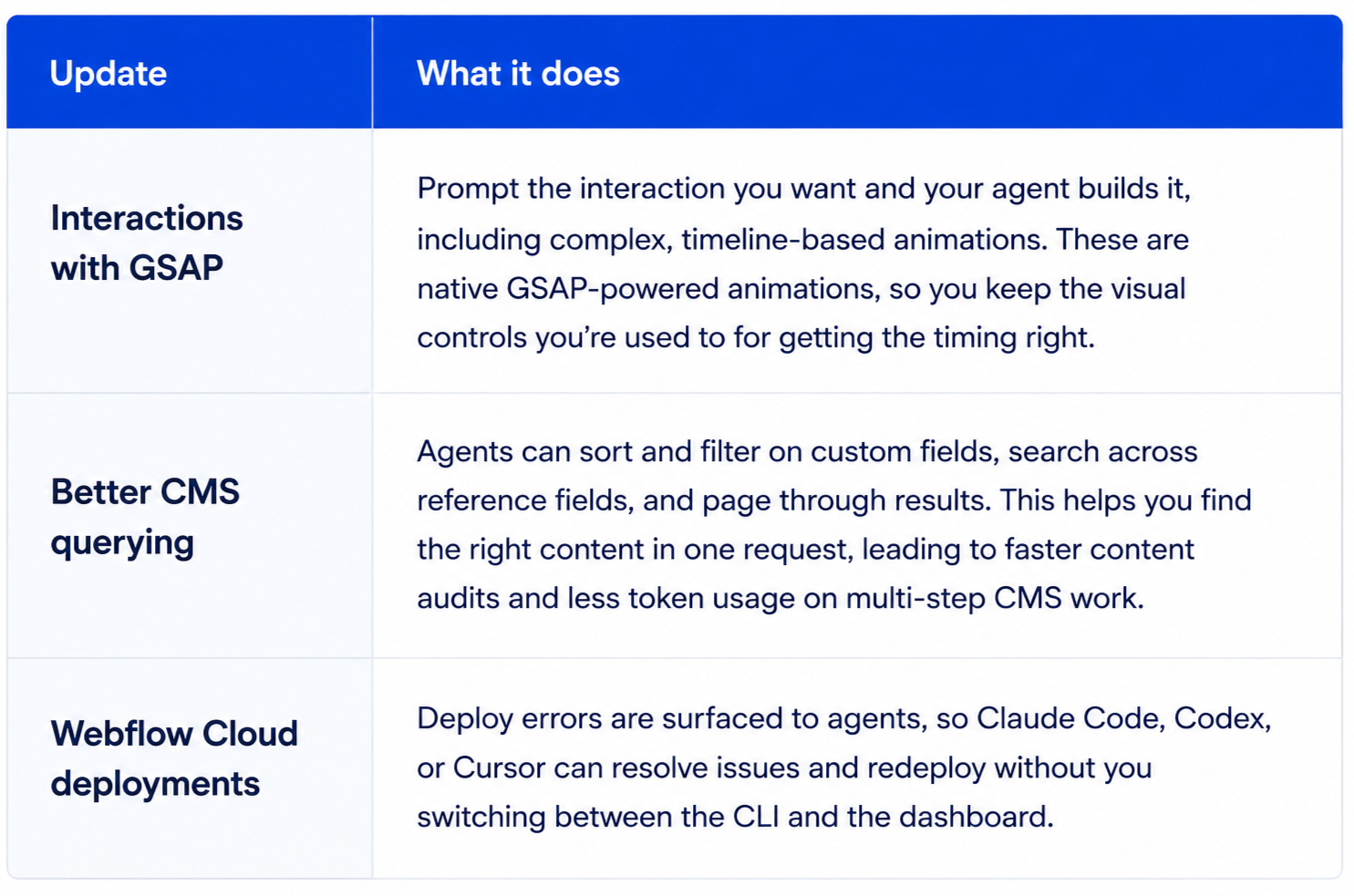
MCP 2.1 is expected to be available to everyone later this month, with expanded access to AEO Analytics and Webflow Optimize planned for later releases.
2. Source by Webflow: The Long-Term Direction
Source is a new platform where marketing teams, designers, developers, and AI agents work in one environment, with code serving as the foundation for what ships. Agents work directly with the shipping code, while designers and marketers still build visually on top of it.
A few things worth knowing:
- Source connects to an existing codebase, CMS, hosting, and marketing tools, including sites already built in Webflow.
- It introduces role-specific Views, giving marketers, designers, developers, and other team members workspaces tailored to the jobs and outcomes they own.
- Governance is built in from the start, with permissions, approvals, roles, and audit trails for agent activity.
.avif)
Source is currently in limited research preview only. It's less "start using this" and more a signal of where the platform is heading.
3. Agent Presence & Agent Collaboration
Webflow is treating agents more like actual teammates rather than a background process. Every agent change is logged in the site activity log, and Agent Presence will let you see where an agent is currently working on the canvas in real time, similar to watching a teammate's cursor move.
On projects with multiple developers, marketers, and agents working at once, this makes it possible to see what an agent is mid-way through changing before anything gets published. Agent Presence is expected later this month.
4. Webflow Campaigns
Campaigns are aimed at marketing teams juggling landing pages, ad creative, variants, and tracking across separate tools.

Campaigns is currently in beta, with availability for purchase expected next month.
5. Webflow Assets
Assets focuses on brand assets and creative production. Rather than generating generic AI output that doesn't match your brand, it pulls context from your existing design system, brand variables, asset library, and approved creative, then adapts what already exists.
.avif)
As an example: feed it a long video and it can trim it, cut filler words, add captions, and adapt it for social, or take an existing static asset and reformat it for another part of the site or a campaign. Everything stays inside Webflow, cutting down on exporting, editing elsewhere, and re-uploading.
Assets is expected to enter beta in October.
6. Releases
For larger projects, Releases lets a team branch the entire website instead of pushing changes straight to production. A release can bundle pages, CMS content, components, assets, and locales. The team and any agents work on that branch, review it together, and merge or publish only when it's ready.
A Release Manager shows what changed, who's working on it, and the current status. Releases is expected in beta later this year.
7. Agent Instructions
Teams could already give agents instructions on how to work within a project, but Webflow can now generate those instructions automatically based on what it understands about the site: brand guidelines, design system rules, asset guidelines, and CMS content rules.
They're generated as editable Markdown files, so you can still adjust them by hand. The goal is to stop agents from shipping something that technically works but ignores the project's design system or brand rules.
Also Announced
A handful of smaller builder-focused updates rounded out the conference: visual editing for AI Code Components, Components in CMS, Breakpoint Canvas, native Popovers, Agentic Translation, Style Props for components, default components for slots, and further performance improvements.
The Takeaway
The bigger shift isn't that Webflow is adding more AI features. It's that AI agents are becoming part of the entire website lifecycle. MCP 2.1 brings agents deeper into existing Webflow projects today, while Source, Campaigns, Assets, and Releases point toward a future where design, development, content, marketing, and deployment operate as one continuous workflow.
For teams building and maintaining websites, the question is becoming less about whether to use AI and more about how much of the workflow agents should own.
Or save this article as a PDF for future research, workshops and strategy sessions
-min.avif)






.svg)